
Product Display Images and Lifestyle Scene Images:Multi-Angle PresentationAnd a Lifestyle Scene Hands-On
The key to a multi-angle display image is “full angle coverage + visual coordination”: the front shows the look, the side the lines, the rear adds details, the interior reveals the layout and the top gives the overview, all with unified background and lighting. The key to a lifestyle scene image is the trinity of “real scene + product subject + functional hints”.
What You’ll Take Away
Display Image Hands-On: The Panda Sports Car Front View
A multi-angle product display image is visual content that helps shoppers understand a product fully: it uses a full range of angles to present the appearance, structural details and design logic, and is key to reducing purchase hesitation and building trust. Two requirements matter: cover all the angles, and use a unified background, lighting and composition so the views form a visual set. Let’s walk through the process with a front-view display image of a “panda-themed sports car”.
Step 1: open Puyo AI’s image generation interface, click the “Model” button, set the image generation model to “Puyo AI Standard”, click “Click / Drag / Paste to Upload Image” to upload a car image, then enter the prompt in the input box:
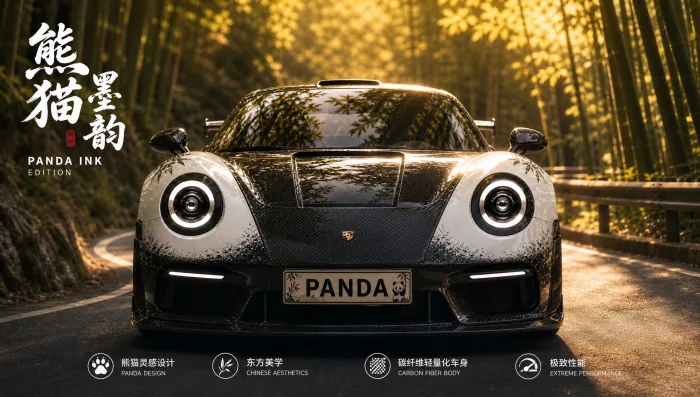
Generate a front-view display image based on this panda-themed supercar. Focus on the front area, clearly presenting the panda-eye headlights (matte black frame + round lamp clusters), the “PANDA” custom license plate, and the black-and-white gradient paint texture on the front fascia. The sports car is parked beside a bamboo forest mountain road curve. Warm golden sunset light illuminates the front from the oblique front, with a blurred background that retains the layered bamboo forest. Suitable for front-detail display, highlighting the visual contrast between the cute panda elements on the front and the sharp supercar fascia, and emphasizing the design highlight of “cute Chinese-style customization”.
Operation: set the model to “Puyo AI Standard”, upload the car image, set the ratio to 16:9, resolution to 2K and image count to 1, then click “Create”.
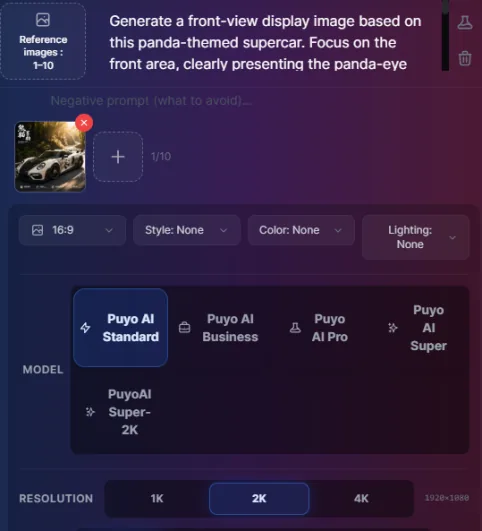
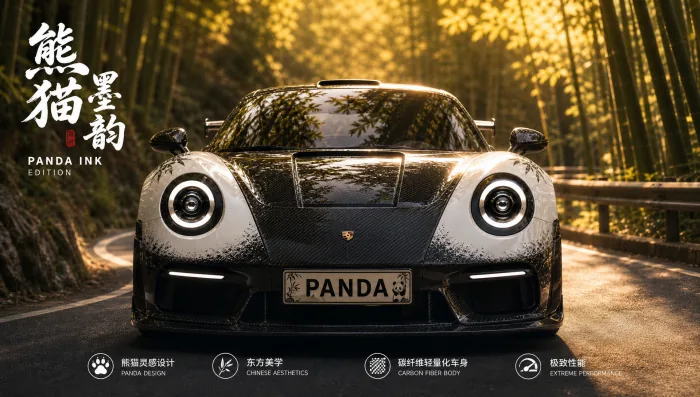
Figure 1-14: Front-View Display Image — Named Details (Headlights, License Plate, Paint) + Scene Enhancement
Notice the division of labor in this prompt: the three front-end elements (panda-eye headlights, PANDA license plate, black-to-white gradient paint) are hard constraints that “must be reproduced”; the bamboo-forest curve, warm golden sunset and blurred background are soft descriptions that “add atmosphere” — hard constraints keep the product consistent, soft descriptions give the image a premium feel.
The Other Four Angles: Side, Rear, Interior and Top
Beyond the front view, there are four standard angles:Side-View DisplayFocus on contour lines and thickness proportions to present a three-dimensional form;Rear-View DisplayAdd detail design and functional ports to complete the information;Interior Display(For products with internal structures) highlight the internal layout and material texture to reinforce detail value;Top-View DisplayPresent the top design and overall layout from a full overhead perspective:
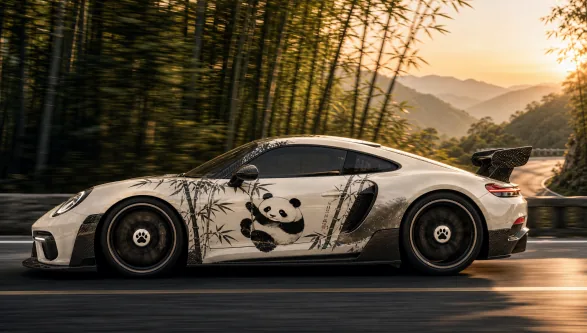
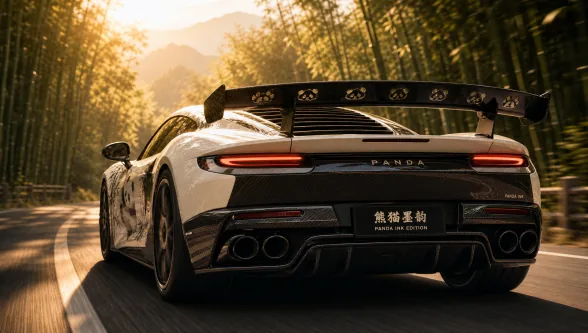
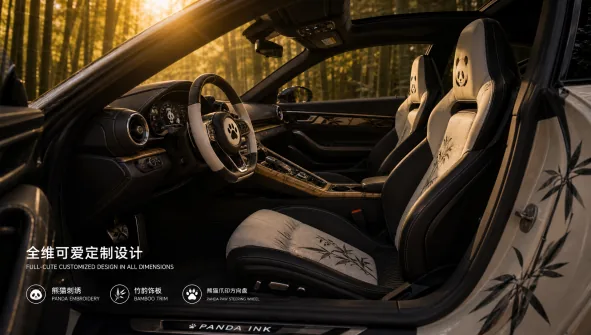
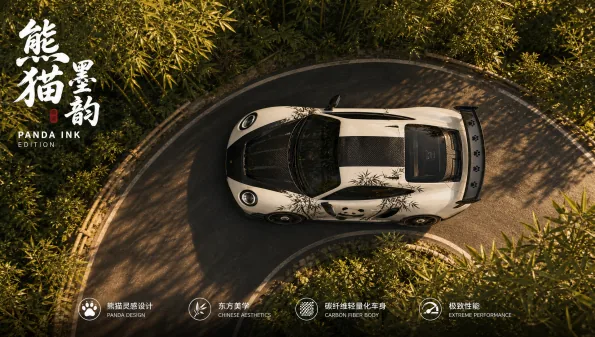
Figure 1-15: Four Supplementary Angles That Complete the Picture of the Product
The prompt framework for all five angles is identical — only swap the angle section and its detail checklist, while keeping the background, lighting and style sections unchanged, so the results naturally form a coherent set.
Lifestyle Scene Image Hands-On: A Chinese-Style Morning Breakfast Scene
A lifestyle scene image is the core visual vehicle for e-commerce conversion: it sparks desire through scene atmosphere and emotional delivery. A good one builds a real scene close to the user’s daily life, highlights the product cleverly and hints at its function through scene details — weaving product value into the scene naturally rather than shouting slogans.
Step 1: open Puyo AI’s image generation interface, click the “Model” button, set the image generation model to “Puyo AI Standard”, click the “Upload Image” button to upload the cup image generated earlier (Figure 1-11), then enter the prompt in the input box:
Generate a lifestyle recommendation photo of a morning Chinese breakfast scene. A light wooden dining table is laid with a light gray linen placemat. This yellow banana-shaped cup holds steaming soybean milk, with thin wisps of white mist rising from the rim. Beside it, a plate contains fluffy soup dumplings and halved boiled eggs. Soft morning natural light streams in from the balcony, casting warm gentle light and shadow across the cup and food. The background is softly blurred to keep focus on the cup paired with the Chinese breakfast. The warm atmosphere makes the breakfast comforting and soothing, highlighting the cup’s daily charm of “bringing more happiness to Chinese breakfast”, suitable for lifestyle posts about Chinese breakfast.
Operation: set the model to “Puyo AI Standard”, upload the cup image, set the ratio to 3:4, resolution to 2K and image count to 1, then click “Create”.
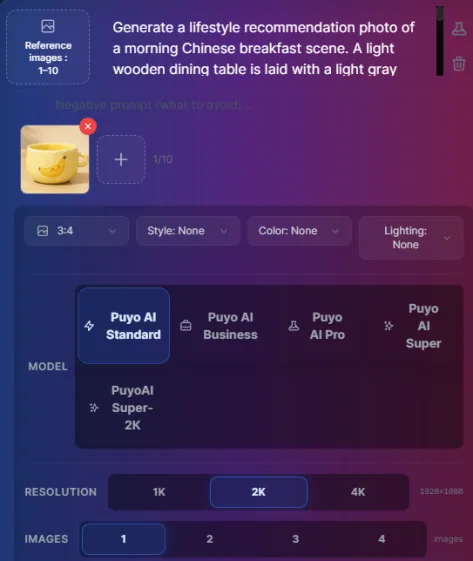
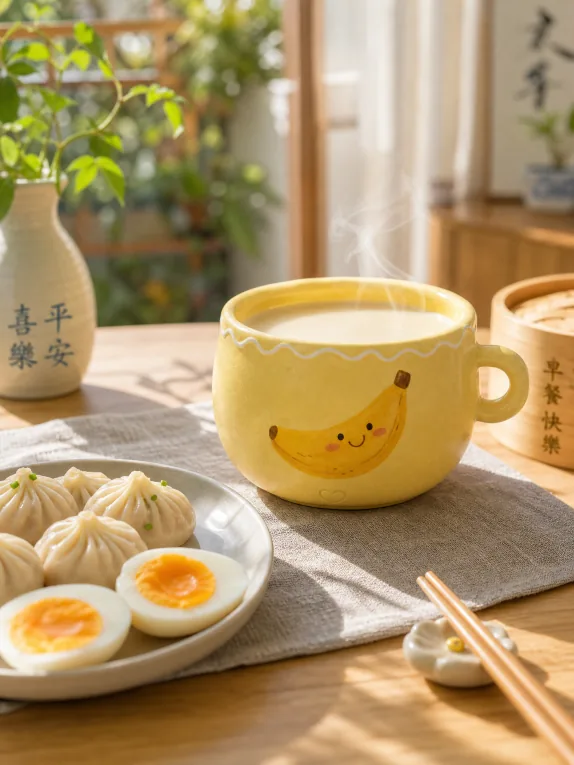
Figure 1-16: Morning Lifestyle Scene — The Everyday Story of Steaming Soy Milk + Warm Morning Light
The key to this image’s “desire-building” power is three dynamic details: steam from the soy milk, morning light streaming onto the balcony, and soft, warm, diffused light — the sense of real life that a static product shot can’t give is carried entirely by these “happening right now” descriptions. The product isn’t staged; it’s living its life.
Four Lifestyle Scenes: Work, Rest, Stay-at-Home and Picnic
Beyond the morning scene, lifestyle images have four other common settings:Work SceneFocus on the practical value of the product in boosting office productivity to meet workplace needs;Rest SceneShow the relaxing experience the product brings and create a laid-back mood;Stay-at-Home SceneHighlight how the product blends into the home setting to convey comfort;Picnic SceneShow the product’s outdoor portability paired with an inviting atmosphere to attract outdoor shoppers:
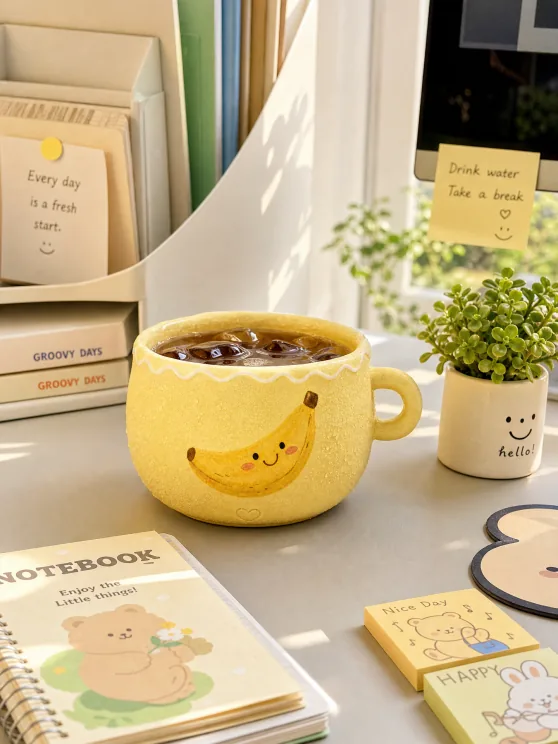
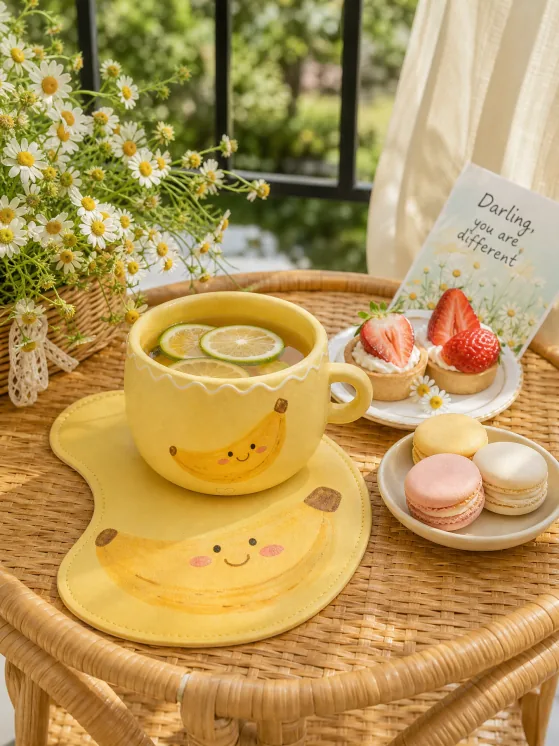
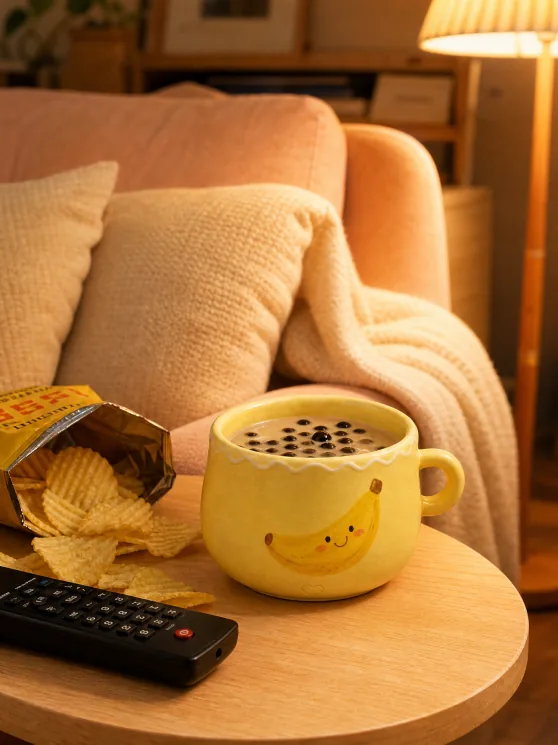
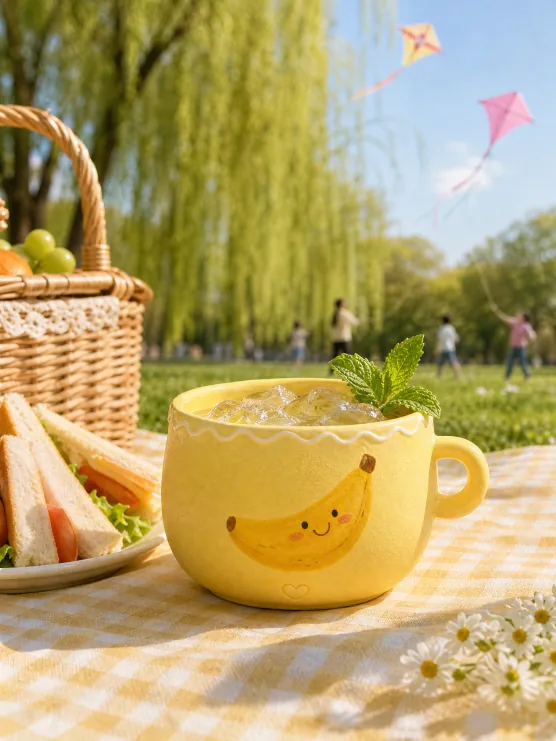
Figure 1-17: Four Lifestyle Scenes — One Product, Four Ways of Living
By this point, the e-commerce image “trust chain” (product images + display images) and “desire chain” (lifestyle scene images) are both in place. The next article adds the final conversion push — marketing campaign images — before moving into the content visualization section.
FAQFrequently Asked Questions
The questions beginners ask most about this guide
Do Multi-Angle Display Images Really Need Every Single Angle?
Choose Based on Product ComplexityThe front highlights the core look, the side shows lines and proportions, the rear presents detail design, the interior reveals the functional layout and the top view gives the overall shape — the more complex the structure (e.g., cars, furniture), the more angles you need to cover; two or three are enough for simple products.
How Do You Keep Different Angles Looking Like “the Same Product”?
Unify Three Things: background, lighting and composition style — use one visual framework so the angles coordinate, then lock the product’s core feature descriptions (paint, badges, shape) in the prompt so AI won’t distort the product.
What Is the Difference Between Generating a New Angle from an Existing Product Image and Generating from Text Alone?
Image-to-Image Locks In Product FeaturesUpload the product image before writing the prompt, and AI will generate a new scene based on the original shape, colors and theme features — this method is recommended for both display images and lifestyle scene images, since product consistency is far higher than with text-only regeneration.
How Do Lifestyle Scene Images and Product Images Divide the Work?
Product Images Build Understanding, Lifestyle Scene Images Spark DesireA product image restores core attributes like appearance, color and material and says “what the product is”; a lifestyle scene image places the product in a real-life setting and says “how much better life is with it” — both are indispensable in the conversion chain.
How Do You Keep a Lifestyle Scene Image from Looking Like a Hard Sell?
Let the Product Be a Resident of the Scene, Not the StarIn the example, the banana cup holds steaming soy milk with soup dumplings and boiled eggs beside it — the product’s function is hinted at naturally through scene details, with the background softened, the pairing in focus and a cozy warm mood bringing out its value.
What Should You Specifically Write for Outdoor Scenes Like a Picnic?
Portability and AtmosphereHighlight the product’s outdoor fit (easy to carry, spill-proof) plus atmosphere elements like a picnic blanket, grass and sunlight, so outdoor shoppers instantly picture themselves “taking it along”.
About the Author: Julia, Veteran AI Image Creator
I have long used AI image generation tools for platform covers, e-commerce images and content visualization, and have guided many complete beginners. Every case, prompt, setting and screenshot in this article comes from real generation records on the Puyo AI platform — not theory, not stitched-together stock material. After display and lifestyle images, the next article moves into marketing campaign images and content visualization, tying together the e-commerce chain and content creation.
Content adapted and polished from the original material “From Novice to AI Art Pro | Complete Hands-On Tutorial Collection”, with all original prompts and figures preserved. Source: https://www.puyoai.com。
Shoot a Complete “Portrait Set” for Your Product
Open the Puyo AI website, upload your product image and generate a full display set with the five-angle formula.
Results are affected by model version and randomness—the same prompt will vary slightly each time it runs; run it a couple of rounds before drawing conclusions.