
Instagram-Style Minimalist Avatars and Xiaohongshu Check-In Illustrations: Two Prompt Sets Ready to Use
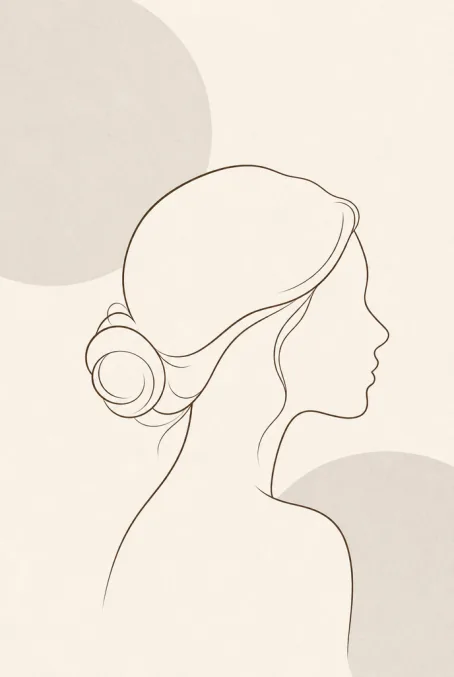
Instagram-style minimalist avatar: write the subject as “side-profile silhouette of a woman + low-saturation cream-white base”, ratio 1:1, resolution 2K; Xiaohongshu check-in illustration: write the subject as “bun-haired girl + street-corner coffee shop scene”, ratio 3:4, resolution 2K. Both prompts are given verbatim in this guide—paste into Puyo AI with the Standard model and generate.
What You Will Take Away From This Guide
Instagram-Style Minimalist Avatar: The Art of Subtracting
Visual expression on social media runs on personalized content: Instagram-style minimalist avatars stand out through clean lines and low-saturation tones. The essence is all subtraction—no facial details, ample negative space, unified palette; the more restrained, the more premium. This prompt set is the version I tested over many rounds—copy it directly:
Minimalist Instagram-style avatar, subject is a side-profile silhouette of a woman with clean, crisp lines and no extra decorations. Background is low-saturation cream white, accented with light gray geometric circles. The figure outline is drawn with thin dark brown lines, only head and shoulder contour, no facial details. Soft and unified color palette, ample negative space, subtle grain texture, simple and premium aesthetic, sized for social media profile picture.
Click “Copy Prompt” at the top right of the card to copy the whole thing, then paste it straight into the generation interface.
The operation takes four steps: open the Puyo AI image generation page, click “Model” and set it to Puyo AI Standard; paste the prompt into the input box; set ratio 1:1, resolution 2K, count 1 image in order; click “Create” to generate:
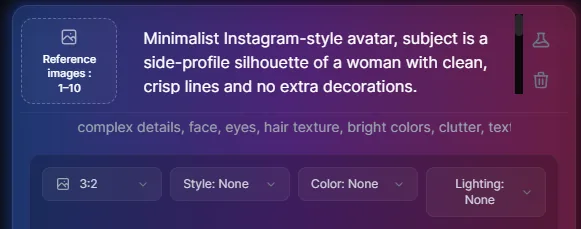
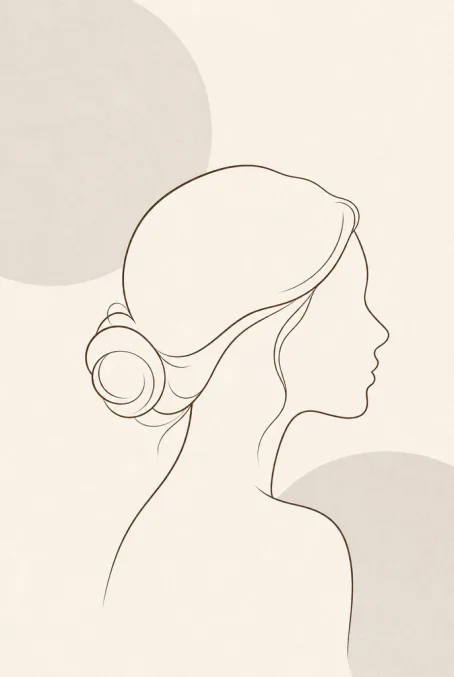
Fig 1-17 Instagram-style minimalist avatar: from input to image
Note that “no facial details” and “ample negative space” in the prompt make or break the result—delete them and the image instantly turns crowded and drifts off style.
Xiaohongshu Check-In Illustration: The Freshness of Adding
The opposite of the avatar, the Xiaohongshu check-in illustration wins through addition: the more vivid scenes and cozy elements, the stronger the share appeal. This prompt lists the scene elements as a checklist—coffee, cake, camera, plants, cherry blossoms, neon sign, art text—none can be missing:
Xiaohongshu check-in illustration, warm-toned street corner coffee shop scene. A girl with a bun hairstyle in a cream-white sweatshirt holds a caramel macchiato and makes a peace sign toward the mirror. A strawberry cake and a vintage film camera sit on the table. There are log-colored tables and chairs, hanging green plants and an "OPEN TODAY" neon sign in the background. Light pink cherry blossoms drift outside the window. Fresh and healing painting style with hand-drawn texture. Art text "Happy Check-in" in the corner, full of girly vibe.
The scene element checklist is the image’s source of liveliness—add or remove as needed, but don’t cut too much at once.
Set the parameters: model Puyo AI Standard, ratio 3:4 (vertical images take the most screen space in feeds), resolution 2K, count 1 image, click “Create”:
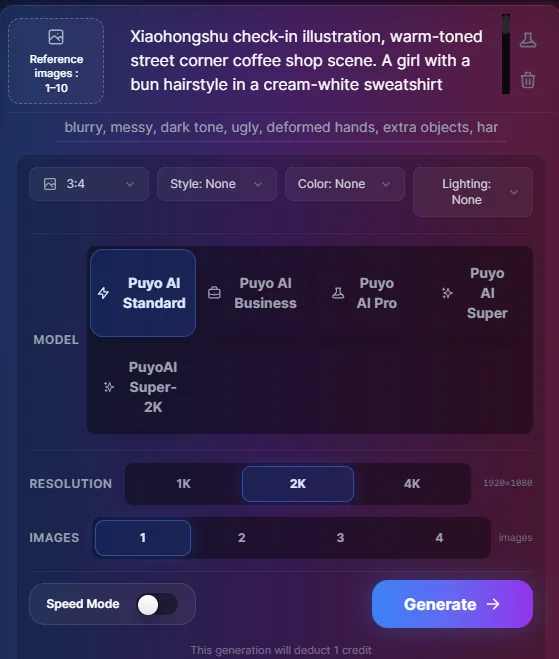
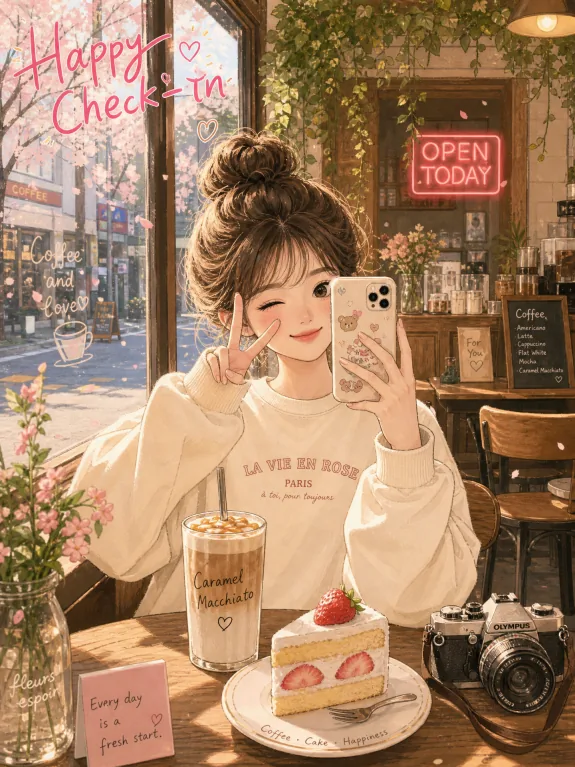
Fig 1-18 Xiaohongshu check-in illustration: from input to image
Remix Ideas and Next Steps
Both templates support changing the subject without changing the skeleton: for the avatar, swap “side-profile silhouette of a woman” for a male or pet silhouette while keeping the low-saturation base and negative-space wording; for the illustration, swap the coffee shop for a bookstore, flower shop, or seaside and update the element checklist to match the scene, keeping the painting-style and texture descriptions untouched. If the output drifts after editing, revisit Part 3, Write Your First AI Art Prompt, to review instruction iteration—change one thing per round.
For chart-type play in work and study scenarios, go to Part 5, AI Knowledge-Note Concept Maps and Project Plan Diagram Prompts; for the more playful dream recreation and game character design, see Part 6, Dream Recreation and Game Character Design Prompts.
FAQFrequently Asked Questions
The questions beginners ask most about this guide
Why not photorealistic for a minimalist avatar?
A tone mismatch. The core of the Instagram style is simplicity and negative space; a fine-line silhouette ages better than a realistic portrait and blends more easily with different platforms’ interface styles.
Will the art text in the check-in illustration come out wrong?
Possibly. AI text accuracy is unstable; short phrases like “Happy Check-in” have high success rates. If the lettering comes out wrong, add one round of “fix the text in the image” via instruction iteration.
Can I swap the scene elements in the prompt myself?
Yes. Elements like cherry blossoms, plants, and neon signs can be replaced with whatever scene objects you want—keep the “subject action + environment elements + mood words + art text” structure unchanged and the image stays coherent.
Can I use other ratios?
Yes. 1:1 fits avatars and circular cropping; for Moments or video-channel covers try 16:9, but in feeds a 3:4 vertical image occupies the most screen area and gets the best exposure.
My result differs from the example—is that normal?
Normal. Generation is random and every round differs; to get closer to the example, set the count related to random seeds to 1 and run several rounds, keeping the best one.
Can guys use this avatar formula?
Yes. Replace “side-profile silhouette of a woman” with a corresponding male subject description and copy the line, base-color, and negative-space wording as is—the minimalist Instagram tone is unaffected by the subject’s gender.
About the Author: Julia, Veteran AI Image Creator
Julia has long used AI image tools for avatars, illustrations, productivity diagrams, and character design, and has coached large numbers of complete beginners. Every case, prompt, parameter, and screenshot in this article comes from real generation records on the Puyo AI platform—not theoretical speculation, not stitched-together stock. This is Part 4 of the series (social media practice); see Part 1 for the formula basics and Part 3 for first-prompt practice.
The content is adapted and polished from the original material “From Novice to AI Art Pro | Complete Hands-On Tutorial Collection”, with all original prompts and figures preserved. Source: https://www.puyoai.com.
Two Prompt Sets in Hand—Go Swap Your Avatar
Open the Puyo AI website, paste in this guide’s prompts, and generate your own social avatar and check-in illustration in 30 seconds.
Results are affected by model version and randomness—the same prompt will vary slightly each time it runs; run it a couple of rounds before drawing conclusions.